iPhoneでテキスト編集をする時、画面の任意の場所でタップすると、コンテキストメニューが表示されてペーストやコピーが選べます。
ところがGoogle Keep では画面をタップしても何も表示されないことがあってイライラします。おそらくこれはバグ。
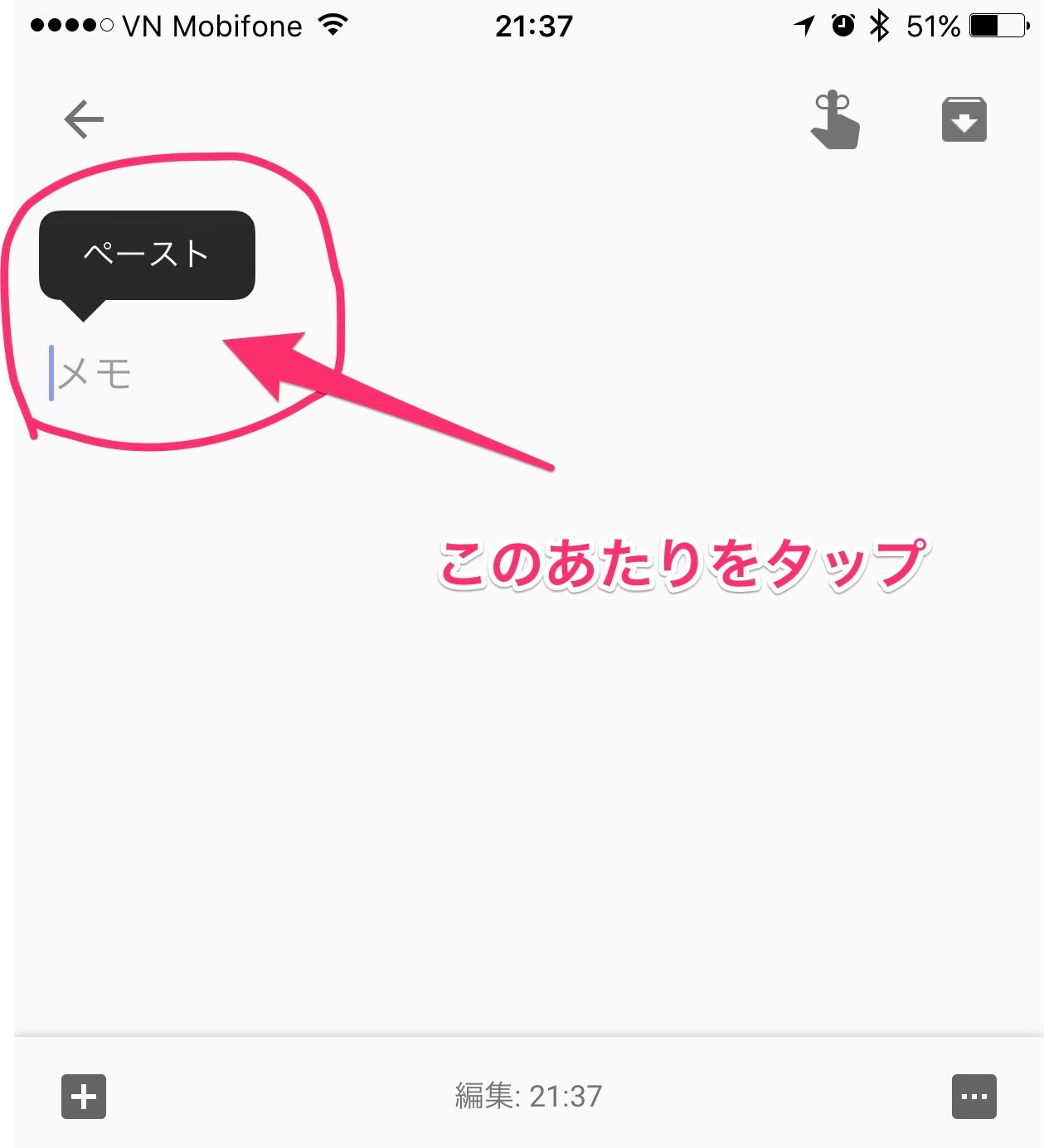
いろいろ触ってみて 「メモ」と書かれたところをタップしないと反応しないことが判明。
次回アップデートで対応を希望。
iPhoneでテキスト編集をする時、画面の任意の場所でタップすると、コンテキストメニューが表示されてペーストやコピーが選べます。
ところがGoogle Keep では画面をタップしても何も表示されないことがあってイライラします。おそらくこれはバグ。
いろいろ触ってみて 「メモ」と書かれたところをタップしないと反応しないことが判明。
次回アップデートで対応を希望。









 Japanese
 Chinese (Simplified)
 Dutch
Dutch English
 French
 German
 Italian
 Khmer
Khmer Korean
 Lao
Lao Russian
 Vietnamese